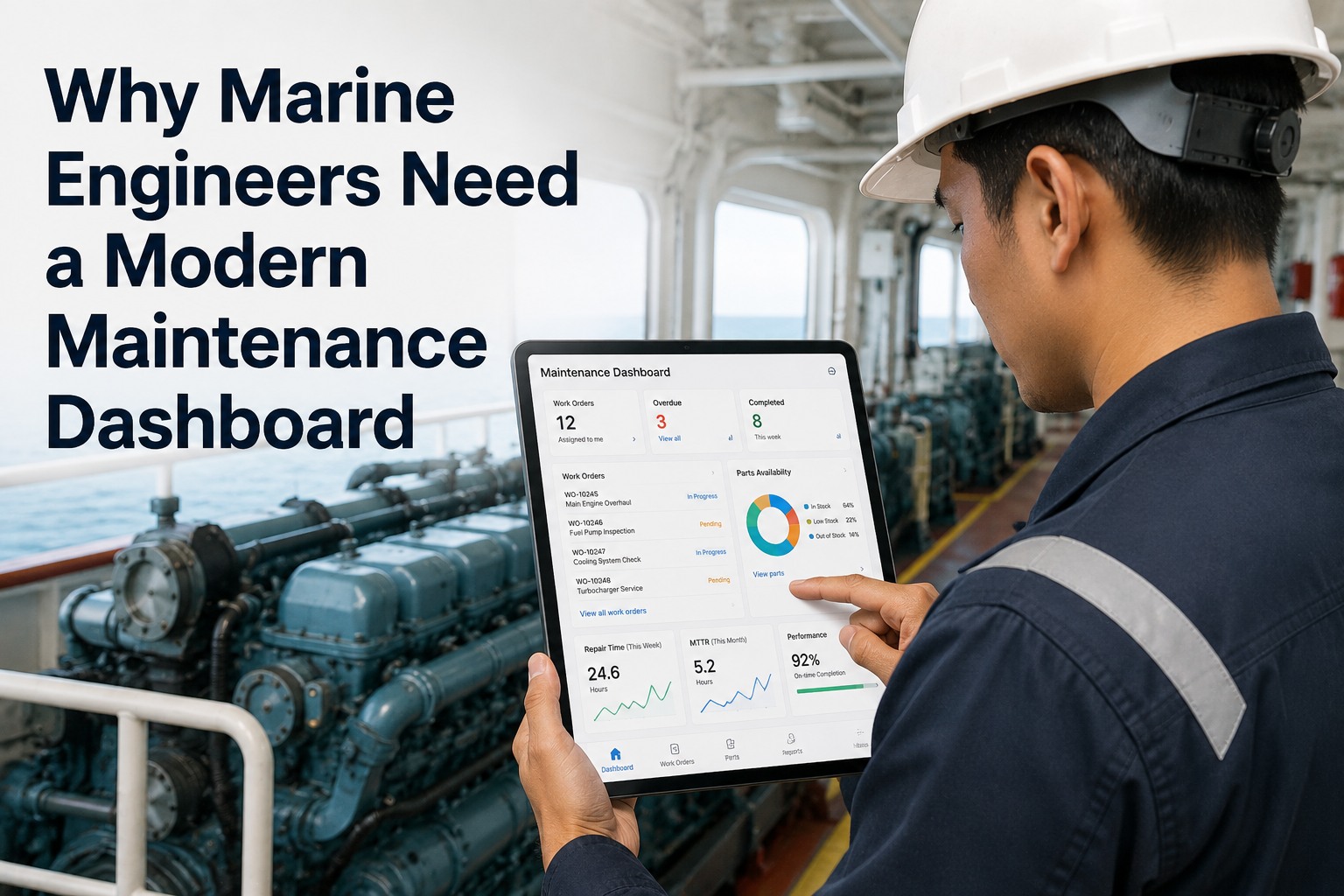
Walk into any commercial vessel's engine room mid-watch and the picture is the same regardless of class, flag, or trade: a chief engineer juggling a clipboard, a stack of OEM service manuals on the bridge, a parts requisition list emailed three weeks ago to shore, a paper time-log per technician, and a planned-maintenance schedule built in Excel that nobody opens between port calls. The job is one of the most technically demanding on a vessel — overhauling cylinder units, rebuilding fuel pumps, troubleshooting separators, calibrating governors, certifying boiler safety valves — yet the digital tooling supporting it has stayed three decades behind the bridge. A modern marine engineer maintenance dashboard fixes this: every work order assigned to the engineer's name appears on a phone or rugged tablet, every spare part in inventory is visible with location and stock level, every minute spent on every job is auto-logged with start/pause/stop, and every reliability KPI the chief engineer cares about — MTBF by component, MTTR by job type, planned-maintenance compliance, spare-parts cost per running hour — is live on a single screen. Start a free trial of Marine Inspection to put your engine room maintenance workflow on the modern footing it has needed for years.
For Chief Engineers · 2nd / 3rd Engineers · Engine Room Crews
Stop Hunting Through Manuals, Spreadsheets, and Email. Run the Engine Room From One Screen.
Assigned work orders, parts availability, repair time tracking, MTBF/MTTR KPIs, and engine-room reliability metrics — one dashboard, mobile-first, built for marine engineers and tested in real engine rooms at sea.
My Work Orders
Chief Engineer · Watch B
CRIT
M/E No.4 Cyl FO Injector
Parts: in stock · 2 hr est.
START
HIGH
A/E No.2 Lube Oil Sample
Lab kit ready · 30 min
START
PM
FW Generator CIP Wash
3rd Eng. · Wk 23 due
QUEUE
The Marine Engineer's Reality — Why Excel and Email Are No Longer Enough
Engine rooms have changed. Modern propulsion plants run dual-fuel engines, electronic governors, common-rail injection, exhaust gas scrubbers, ballast water treatment systems, and selective catalytic reduction units — equipment that did not exist when most onboard maintenance routines were designed. Yet the maintenance management toolset on most vessels is still built around a paper or Excel-based planned-maintenance system, three-month-old supply requisitions, and OEM manuals scattered across the bridge, the chief's office, and a USB drive in the spares store. The mismatch between equipment complexity and management toolkit costs operators measurable downtime, parts wastage, and crew time. Book a Marine Inspection demo to see what a modern engineer dashboard replaces.
Excel-Based PM Schedule Nobody Opens
PM tasks live in a spreadsheet that the previous chief engineer built. Running hours not synced. Half the entries are obsolete. The 2nd engineer has built their own parallel list. The 3rd engineer uses neither.
Parts Hunt Through Three Stores
Looking for a specific gasket. Stock card says it's in Spare Parts Store 2. It isn't. After 30 minutes of searching, found in Engine Room Workshop. Or maybe it's been used and not reordered. Nobody knows.
OEM Manuals Spread Across Three Locations
The MAN main engine manual is in the chief's office. The cooling pump manual is on a USB drive in the engine control room. The ballast water treatment manual lives only in shore office email.
Time Spent on Jobs Logged on Paper
Every technician fills out a paper time log. Hours guessed at end of watch. Variance between budget and actual lost in transcription. No data for next time the same job comes around.
MTBF and MTTR Calculated Once a Year
Reliability KPIs the chief engineer should track continuously are calculated annually for the technical superintendent's report. Trends spotted too late to inform overhaul planning.
Spare Parts Requisitions in Email Limbo
Critical part requisition sent to shore three weeks ago. No status update. Confirmation that it shipped never received. Chief engineer reorders, then both arrive in the same week.
What a Modern Marine Engineer Dashboard Actually Shows
The first principle of an engineer-focused dashboard is that it shows what the engineer needs to act on TODAY — not aggregate fleet metrics, not boardroom KPIs, not last quarter's reliability trends. The six widgets below appear on every well-designed engineer dashboard and absent from most legacy maintenance systems. Each one collapses a paper or email-based process into one tap or one screen.
The Component Tree — How Engineers Actually Navigate Maintenance
Engineers do not think in flat work-order lists. They think in equipment hierarchies. The main engine has cylinder units which have fuel injectors, exhaust valves, piston assemblies, and connecting rods. The auxiliary generators have engines, alternators, governors, and excitation systems. The fuel system has tanks, pumps, filters, viscosity controllers, and treatment units. A modern engineer dashboard navigates by this hierarchy — drill from system to component to part — and pins all maintenance history, OEM documentation, parts lists, and KPIs to the relevant level.
SYSTEM
Main Propulsion
Slow-speed or medium-speed main engine, reduction gearbox, propeller shaft, controllable-pitch propeller hub. Top-level dashboard shows cylinder firing pressures, exhaust temps, scavenge air pressure.
SYSTEM
Auxiliary Power
Diesel generators, alternators, switchboards, emergency generator, shaft generator. Load sharing, parallel operation, blackout response — KPIs at system level.
SYSTEM
Fuel & Lube Oil
Bunker tanks, settling tanks, service tanks, transfer pumps, supply pumps, viscosity controllers, separators (FO and LO), heaters, filters. Differential pressures and lab analyses tracked.
SYSTEM
Cooling & Heat Exchange
Sea water cooling pumps, fresh water cooling system, jacket water expansion tanks, charge air coolers, lube oil coolers, plate heat exchangers. Temperatures and flow rates trended.
SYSTEM
Compressed Air & Steam
Main and starting air compressors, working air, control air, instrument air, auxiliary boiler, steam dump, condensate return system, hot well, feed pumps.
SYSTEM
Environmental Compliance
Exhaust gas scrubbers, SCR units, EGR systems, ballast water treatment, sewage treatment, oily water separator, incinerator. Compliance reporting integrated.
The Engineer KPIs That Actually Drive Decisions
Reliability metrics are routinely calculated for the technical superintendent's annual report and never seen by the engineer who could act on them. A modern engineer dashboard surfaces them live — and tunes them to the engineer's actual decision points: whether to overhaul this week or next, which component class is trending toward failure, where parts spending is concentrated, and which jobs run consistently over time budget.
MTBF
Mean Time Between Failures
Average operating hours between unplanned failures, tracked per equipment class. Trending downward signals condition deterioration before catastrophic failure. Critical for overhaul interval decisions.
MTTR
Mean Time To Repair
Average time from failure to operational restoration. Captures both response speed and crew capability. Falling MTTR = better tooling, parts availability, or crew skill.
PM-CMP
Planned Maintenance Compliance
Percent of PM jobs completed within their due window. Below 90% triggers superintendent escalation. Class society and PSC inspectors look at this as a leading indicator.
PCRH
Parts Cost per Running Hour
Spare parts spend divided by equipment running hours. Surfaces cost outliers — the auxiliary generator burning through injectors, the FO booster module that keeps failing.
EST-VAR
Estimate vs Actual Variance
For each completed job, actual labor hours versus original estimate. Persistent overruns signal scope-mismatch, training gaps, or systemic issues with that job category.
DT-UNP
Unplanned Downtime Hours
Hours equipment is unavailable due to unplanned events. The number that translates most directly to commercial loss. Trended monthly with root-cause categorization.
How a Modern Engineer Dashboard Compares to Paper, Excel, and Generic CMMS
Three baseline alternatives compete for an engineer's daily workflow: paper-based PM systems, in-house Excel registers, and generic shore-side CMMS bolted onto a vessel. Each has structural limitations a marine-engineer-built dashboard solves. Scroll horizontally on mobile to see the full comparison.
| Capability |
Paper PM System |
Excel-Based Register |
Generic CMMS |
Marine Engineer Dashboard |
| Work order assignment to engineer |
Posted on noticeboard |
Cell color-coded |
Email notification |
Mobile push notification |
| Time-on-job tracking |
Paper time-log card |
Manual cell entry |
Manual web entry |
One-tap timer per job |
| Parts availability check |
Walk to store, count |
Last-updated stock card |
Often unsynced |
Real-time live stock view |
| OEM manual access |
Bridge / chief's office |
Linked URL maybe |
Separate document system |
Pinned to component, one tap |
| Running hours sync |
Manual log book entry |
Manual cell update |
Periodic batch update |
Auto-sync from engine logs |
| MTBF / MTTR calculation |
Annual report only |
Pivot table every quarter |
Buried in BI module |
Live on engineer dashboard |
| Photo evidence on completion |
Camera, USB transfer |
Separate photo folder |
Web upload, slow |
Phone camera direct to job |
| Class survey evidence pack |
Manual binder assembly |
Spreadsheet print |
Custom report build |
One-tap class evidence pack |
| Spare parts requisition |
Email to shore |
Email to shore |
Form fill-in |
Auto-trigger on stock-out |
| Crew handover at port relief |
Verbal + paper |
Spreadsheet email |
Login transfer |
Live status visible to relief |
| Mobile use in engine room |
Not applicable |
Not designed for it |
Often desktop-only |
Mobile-first, rugged tablet |
| Class society type approval |
Generally accepted |
Variable acceptance |
Some platforms approved |
Multi-class type approved |
Stop Building Excel Trackers Each Time a Chief Engineer Joins the Vessel
Marine Inspection puts work orders, parts, OEM manuals, time tracking, and reliability KPIs on one engineer dashboard — mobile-first, type-approved, deployed in days. Engine room crews report 30% spare parts cost reduction and substantially faster class surveys.
The Three Trigger Types for Planned Maintenance Scheduling
Generic CMMS often supports only calendar-based PM scheduling — "every 90 days regardless of usage." Marine maintenance requires three trigger types working together. A modern engineer dashboard schedules every PM job using the right trigger for that equipment class, avoiding the over-maintenance and under-maintenance failures that calendar-only systems generate.
01
Running Hours
For rotating machinery — main engines, generators, pumps, compressors. Service interval defined by the OEM in operating hours. Auto-synced from engine logs, so 1,500 running-hour fuel injector inspections trigger the moment the unit reaches the threshold.
Main engine cylinder overhauls
Generator fuel injector inspection
Sea water pump bearing replacement
02
Calendar Intervals
For equipment whose degradation is time-driven rather than usage-driven — emergency systems, lifesaving appliances, regulatory checks. Statutory intervals published by class societies and flag states. Calendar engine triggers PM creation regardless of running hours.
Emergency generator weekly test
Lifeboat engine monthly run
Class society annual surveys
03
Condition-Based Triggers
For equipment with health-monitoring sensors — vibration, temperature, pressure, oil analysis. PM job triggered when measurement crosses threshold rather than at fixed interval. Cuts unnecessary work and catches developing failures earlier.
Vibration-triggered bearing inspection
Lube-oil-analysis service trigger
Differential-pressure filter change
The Engineer-to-Shore Workflow — From Defect Capture to Spare Part Onboard
The engineer dashboard is one half of a longer workflow. A defect logged in the engine room must reach the technical superintendent's review queue, the procurement team's spare parts pipeline, and the class society's compliance evidence file — without manual re-entry, copy-paste, or lost emails. The right dashboard is the front-end of an integrated chain.
1
Engineer Captures Defect
2nd engineer logs defect on tablet during engine room round. Component identified from tree (M/E No.4 cylinder fuel pump), severity tagged, photo of leak attached, voice note describing condition.
2
Auto-Generate Work Order
Defect creates work order tied to the specific component. Job-card template auto-loaded from OEM data. Estimated parts list generated. Estimated labor hours pre-populated from prior similar jobs.
3
Parts & Risk Check
System checks parts in stock. If unavailable, requisition auto-drafted to shore procurement. Risk assessment template loaded. Permit-to-work generated for hot work or confined space if needed.
4
Shore Approval & Procurement
Critical-severity items push to shore superintendent in real time. Procurement releases purchase order to OEM or distributor. Shipping tracked. Vessel notified at agent of next port call when parts will arrive.
5
Execution & Closure
Engineer executes job with mobile-attached OEM manual, time-tracked, photos captured. Closure includes serial numbers of parts replaced, calibration data, condition notes. Class society evidence pack updated automatically.
Why Mobile Matters in the Engine Room
Engineer dashboards built for desktop computers in the chief's office solve part of the problem. The other part is solved only when the same dashboard runs on a phone or rugged tablet that the engineer carries onto the engine room floor. The five reasons below explain why engineers who switch to mobile-first never go back.
Capture in the Field, Not From Memory
Engineer is at the equipment when the defect is identified, the photo is taken, the temperature is read, the oil sample is collected. Mobile capture in real time eliminates transcription errors and end-of-watch memory loss.
OEM Manuals Where the Hands Are
Looking up clearances for the cylinder unit currently being overhauled requires the manual at the unit, not 40 meters away on the chief's desktop. Mobile pinned-document access saves 15-20 minutes per troubleshooting cycle.
Parts Lookup Without Walking Three Decks
Standing at the equipment with a phone, the engineer searches for the part, sees stock and storeroom location, dispatches a junior engineer to retrieve. Five-minute task instead of 30-minute hunt.
Time Tracking Without Paper Log Cards
Start timer on phone when work begins. Pause for lunch. Pause for tools fetch. Stop on completion. Actual labor time captured automatically with no dishonest rounding and no end-of-watch reconstruction.
Class Survey Without the Pre-Survey Scramble
Class surveyor arrives. Engineer hands them a tablet showing the current state of the entire maintenance system — open jobs, closed jobs, photo evidence, certificates, oil analyses. The pre-survey three-day scramble disappears.
Implementation — From Decision to First Engine Room Use in 10 Days
Marine engineer maintenance dashboards deploy faster than enterprise CMMS systems because the engineer's daily workflow is concentrated in a small set of tools. Most fleets reach productive use within two weeks of the decision, with no shore-side consulting engagement needed. Book a demo to walk through the deployment timeline yourself.
Day 1-2
Account & Equipment Tree
Vessel particulars entered. Component hierarchy imported from existing PM data or built from OEM equipment list. Asset register loaded with serial numbers, running hours, manuals.
Day 3-4
PM Jobs & Triggers
Existing PM job library imported. Trigger types assigned per equipment class — running hours, calendar, condition-based. Class-required jobs verified against survey checklist.
Day 5-6
Spare Parts Inventory
Storeroom layout configured. Parts loaded from existing inventory with quantities, locations, and reorder thresholds. Barcode scanning configured for issue and receipt.
Day 7-10
Engineers Onboard & Productive
Chief and 2nd engineer trained on mobile app. First live work orders captured. Time tracking active. Reliability KPIs populating. Paper PM system retired with retention copies.
The ROI Case for Marine Engineer Dashboards
Operators who deploy modern engineer dashboards typically see returns across five compounding dimensions, with payback for mid-size fleets within 6-9 months on the engineer-tooling investment alone — before counting fleet-wide benefits.
30%
Spare Parts Cost Reduction
Documented operator outcome from real-time inventory visibility eliminating duplicate orders, surfacing dead stock, and tightening reorder thresholds.
15-30%
Unplanned Downtime Reduction
Achieved through condition-based PM triggers catching developing failures before catastrophic events, plus better PM compliance.
2-3 hr
/Watch Saved on Admin
Per chief engineer per watch — time previously spent on Excel updates, paper time-logs, parts hunting, and manual KPI calculation.
90%+
PM Compliance Achievable
Threshold class society and PSC inspectors look for. Excel-based systems typically run 65-80%. Mobile-first dashboards consistently above 90%.
6-9 mo
Typical Payback
Mid-size fleets (10-30 vessels) recoup engineer dashboard cost within 6-9 months — parts savings alone typically clear the bill.
Why Marine Inspection For The Engine Room
Marine Inspection is built engineer-first: every workflow tested in real engine rooms, every screen designed for use with one hand while the other holds a tool, every KPI tuned to chief-engineer decision points. Class society type-approved. OEM manual library integrated. Spare parts inventory live. Mobile-first across iOS and Android. Book a live demo with the engineer's view, or sign up for a free trial and configure your engine room in two weeks.
01
Engineer-First Design, Tested in Real Engine Rooms
Every workflow built around the engineer's actual day — work orders, parts, time tracking, KPIs. Not a fleet manager's dashboard with the engineer bolted on.
02
Component Tree With OEM Documentation Pinned
Hierarchy from system to component to part. Manuals, drawings, parts lists, service history pinned to the right level. One tap from the engine room floor.
03
Three Trigger Types for PM Scheduling
Running hours, calendar intervals, condition-based — each PM job uses the right trigger for that equipment class. No over-maintenance, no missed services.
04
Live Spare Parts Inventory With Barcode
Real-time stock by storeroom, on-order quantities visible, reorder alerts at minimum thresholds, barcode scanning for issue and receipt. Parts hunting eliminated.
05
Engineer-Relevant KPIs Live, Not Annually
MTBF, MTTR, PM compliance, parts cost per running hour, estimate-vs-actual variance — all live on the dashboard, tuned to the chief engineer's decision points.
06
Mobile-First, Class Society Type-Approved
iOS and Android, rugged tablet compatible, offline-capable. Type-approved by major class societies. Suitable as part of class-approved Planned Maintenance Survey systems.
Run the Engine Room From One Screen — Starting Next Week
Component tree, work orders, parts, time tracking, MTBF/MTTR live, OEM manuals pinned, mobile-first, class society type-approved. Ten-day deployment, 6-9 month payback. Book a demo to see the engineer's view, or start a free trial today.
Frequently Asked Questions
How is this different from a generic CMMS?
Generic CMMS platforms are built for shore-based facilities — manufacturing plants, hospitals, commercial buildings. They handle work orders and parts but lack marine-specific elements: vessel-asset hierarchy, class society type approval, OEM manual integration for marine machinery, running-hours sync from engine logs, statutory PM job library tied to flag-state requirements, mobile-first design for engine room use, and offline capability for at-sea operation. Marine Inspection is built around the marine engineer's workflow specifically — every feature tested in real engine rooms rather than retrofitted from generic facility maintenance software.
Does it integrate with engine running-hour data automatically?
Yes. Running hours are pulled from engine logs, alarm and monitoring systems, or manual entry as fallback. PM jobs trigger automatically when running-hour thresholds are reached — 1,500 hour fuel injector inspections, 6,000 hour cylinder unit overhauls, 12,000 hour piston ring renewals — without engineer intervention. The same data populates the running-hour KPIs displayed on the component tree, so engineers see at a glance how close each major component is to its next service interval.
What about offline use when satellite connection drops?
Full offline capability. Work orders captured, completed, and signed at sea regardless of connectivity. Parts issued and time-logged offline. The moment connectivity returns — entering port range, satcom restored — the app automatically syncs all queued data to shore management. Engineers take no action; sync happens silently in the background. Conflict resolution handles the rare case where the same record was modified offline on multiple devices.
Is the platform type-approved by class societies?
Yes — multi-class type approval covering major class societies. The platform is suitable as part of class-approved Planned Maintenance Survey (PMS) systems, allowing operators to use the dashboard's evidence chain in lieu of traditional class survey procedures. The audit trail with master and chief engineer signatures, timestamped events, photo evidence, and immutable records meets class society documentation requirements.
How does spare parts inventory stay accurate?
Three mechanisms keep inventory accurate. First, every parts issue against a work order auto-decrements stock — no separate inventory transaction needed. Second, every parts receipt against a purchase order auto-increments stock with serial numbers captured if applicable. Third, barcode scanning at issue and receipt eliminates manual count errors. The inventory dashboard shows real-time stock by storeroom location, on-order quantities, recent consumption, and reorder alerts when below minimum thresholds. Operators report parts costs dropping 30% within months as duplicate orders disappear and dead stock surfaces.
Can chief and 2nd engineers see different views?
Yes. Role-based dashboards adapt to the engineer's responsibility. Chief engineer view shows all open work orders across the engine department, MTBF/MTTR fleet KPIs, spare parts requisition queue, and class survey readiness. 2nd engineer view shows their assigned work orders, the auxiliary systems they own (typically generators, fuel system, lube oil), and their running-hour responsibilities. 3rd engineer view is similarly scoped to their typical scope (cooling systems, compressors, evaporator). Each engineer sees what they need to act on, not the full department's data.
How long does deployment take for a typical fleet?
Per-vessel deployment runs in approximately 10 days. Day 1-2: account setup and component tree import. Day 3-4: PM job library and trigger configuration. Day 5-6: spare parts inventory loading. Day 7-10: engineer training and first live work orders. For a fleet of 10-30 vessels, full rollout typically completes in 8-12 weeks with phased onboarding. No back-office consulting engagement required — operators run their own deployment with platform support as needed.
How does Marine Inspection support the engineer's daily workflow?
Built engineer-first: every workflow tested in real engine rooms; mobile-native design for use with one hand while the other holds a tool; component tree hierarchy with pinned OEM documentation; three PM trigger types (running hours, calendar, condition-based); live spare parts inventory with barcode scanning; one-tap time tracking per work order; engineer-relevant KPIs (MTBF, MTTR, PM compliance, parts cost per running hour) live on the dashboard; class society type approval; offline capability for at-sea operation; defect-to-work-order automatic pipeline integrating engineer mobile capture with shore procurement and class evidence. The engineer dashboard a chief actually uses, every watch.