Receipts are the small paperwork that causes outsized trouble. A launch fare, a chandler's cash slip, a port services charge, a fuel receipt from a remote berth — each is a minor amount, but each has to be captured, categorized to the right account, attributed to the right vessel and voyage, and entered into the books. On most fleets that happens at the end of a voyage, when an officer empties a pocket of crumpled slips and someone ashore transcribes them, days or weeks after the spend, with the usual two-to-five percent of manual errors and a handful that simply go missing. AI receipt processing replaces all of that with a single action: snap a photo. The AI reads the receipt, categorizes the expense, attaches it to the correct vessel and voyage, and updates the books automatically — across the whole fleet, in real time, with the image filed against the entry for audit. The slip never has to be kept, the data never has to be typed, and the cost shows up in the books while it still means something. This page walks through the receipt problem you already live with, the snap-to-books flow that fixes it, what the AI does with each receipt, and why an integrated tool beats a generic scanner app. To see a receipt go from photo to posted entry, book a Marine Inspection demo.
Snap. Categorize. Posted.
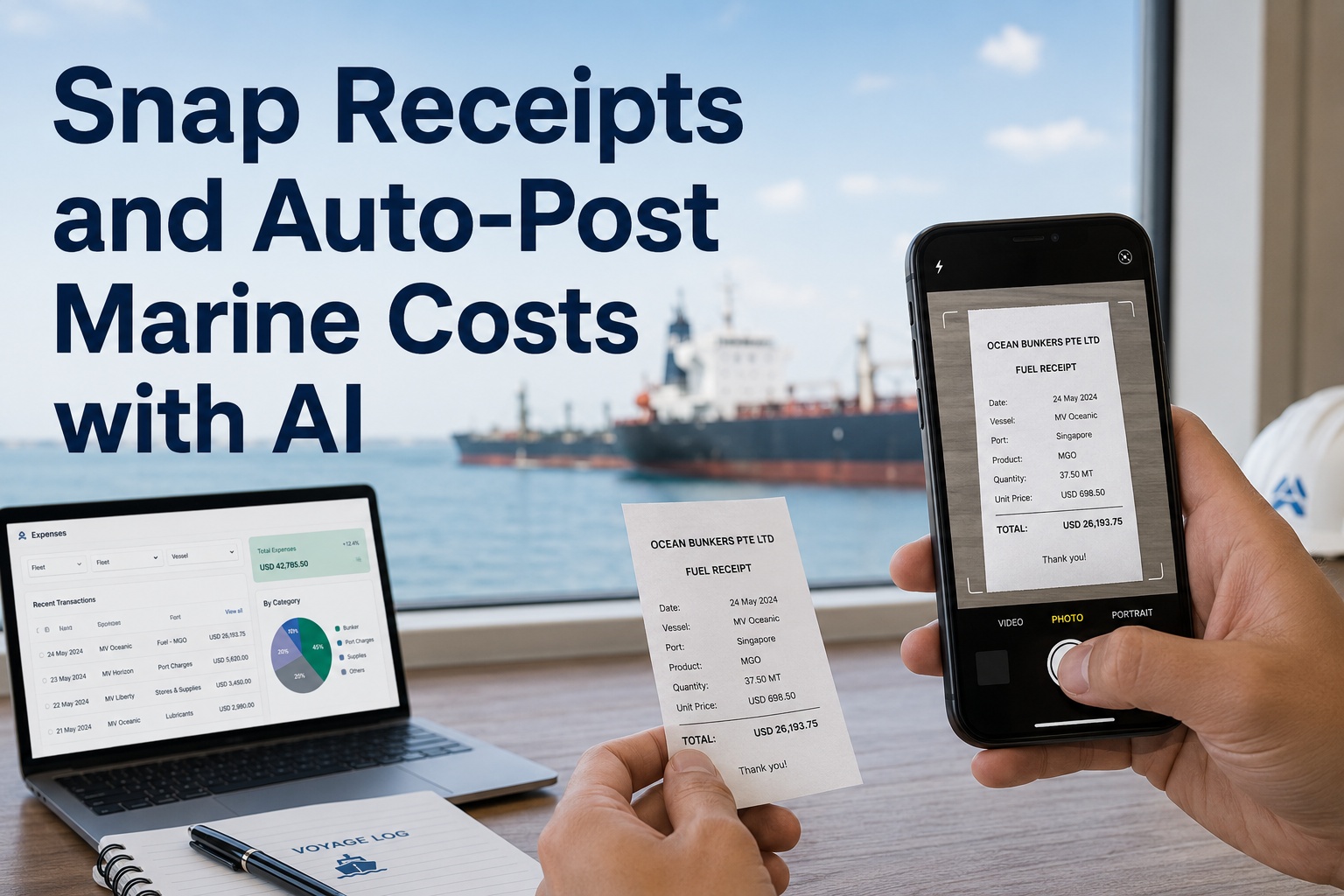
Snap Receipts and Auto-Post Marine Costs with AI
Snap a receipt and AI categorizes it, attaches it to the right vessel and voyage, and updates your books automatically across the fleet — no kept slips, no end-of-voyage transcribing, no stale numbers.
One photothe only action the crew takes
Auto-codedcategorized and attributed by the AI
Real timebooks updated when the spend happens
Fleet-wideevery vessel in one set of books
The Receipt Problem You Live With
Receipt handling is the kind of small, constant friction that never gets fixed because no single slip is worth the effort — yet collectively they cost real money, distort reporting, and create audit gaps. See the alternative in a demo.
Slips pile up and fade
Receipts collect in a pocket or drawer until the end of the voyage, by which time some are lost, faded, or impossible to attribute.
Typed in late, by hand
Someone ashore keys each slip into the books days later, slowly and with the two-to-five percent error rate manual entry always carries.
Wrong vessel, wrong account
When a slip is entered long after the fact, it is easy to attribute it to the wrong vessel, voyage, or expense category.
Costs show up too late
Because entry lags the spend, voyage cost is stale by the time it lands in the books, too late to inform any decision.
From Snap to Books — the Flow
The whole point is to collapse a multi-step, multi-person chore into one action by the person who holds the receipt. Everything after the photo is automatic.
1
Snap the receipt
The crew member photographs the slip on a phone or tablet at the moment of spend — at the quay, in the launch, anywhere.
2
AI reads it
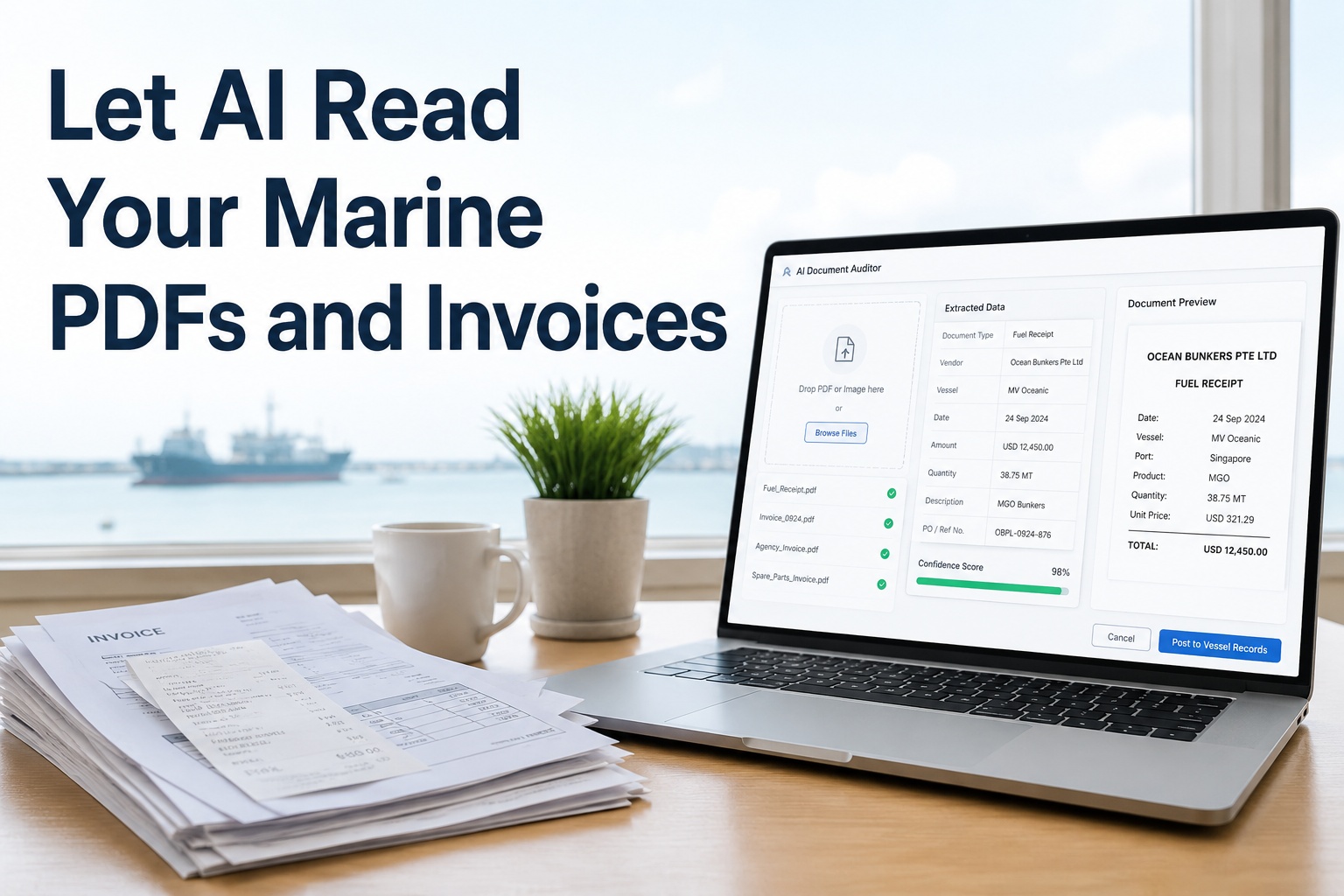
Intelligent OCR extracts the vendor, date, amount, currency, and tax — even from a creased or poorly lit photo.
3
Categorize & attach
The AI assigns the expense category and attaches it to the right vessel and voyage from context, learning from past entries.
4
Update the books
The coded entry posts to the books with the image attached, and anything uncertain routes to a quick review.
Because the capture happens at the point of spend, the receipt is recorded while it is fresh and correctly attributed — not reconstructed weeks later from a faded slip. The crew's entire involvement is taking the photo; the categorization, attribution, and posting are the AI's job.
What the AI Does With Each Receipt
Behind the single photo, the AI performs the steps a bookkeeper used to do by hand, faster and more consistently. See it categorize a receipt in a demo.
Reads the key fields
Vendor, date, total, currency, and tax are extracted from the image, including multi-currency receipts from foreign ports.
Categorizes the expense
The spend is coded to the right account — fuel, port services, stores, agency, crew — learning your coding patterns over time.
Attaches to vessel & voyage
Each receipt is tied to the correct ship and voyage, so cost lands against the right cost center automatically.
Converts currency
Foreign-currency amounts are recognized and converted, so a receipt from any port posts in your reporting currency.
Flags duplicates
A receipt photographed or submitted twice is caught, preventing the double entries that manual handling lets slip.
Files the image
The original photo is stored with the posted entry, so every cost in the books has its source receipt for audit.
See it on your fleet
Watch a Photo Become a Posted Cost
Snap a fuel or port receipt and watch Marine Inspection read it, categorize the expense, attach it to the vessel and voyage, convert the currency, and post it to your books in seconds — with the image filed for audit and only the uncertain items sent for review. Book a 30-minute demo to see it on your receipts, or start a free trial and snap your first one today.
Captured at the Quay, Not the Desk
The single biggest gain is moving capture from the shore desk weeks later to the crew member's hand at the moment of spend. That shift is what makes the data accurate and timely. See mobile capture in a demo.
Pocket-and-Transcribe
Slip stuffed in a pocket, kept for weeks
Faded or lost before it is entered
Keyed in ashore, long after the spend
Mis-attributed to the wrong vessel or account
Cost lands in the books too late to matter
Snap-and-Post
Photographed the instant it is received
Image filed safely from that moment
Read, coded, and posted automatically
Attributed correctly from fresh context
Cost in the books in real time
Who Gets Their Time Back
Receipt handling lands on several people across a fleet. The snap-to-books flow gives each of them back the time the manual chore consumed.
Ship's Crew
One photo and done — no slips to keep, no expense forms to fill out at the end of a voyage, no chasing lost receipts.
Accounts Team
No manual keying of slips; entries arrive pre-coded and attributed, leaving only the occasional exception to review.
Superintendent
Real-time voyage and vessel cost instead of figures that arrive after the voyage is over, so overspend is seen as it happens.
Auditor
Every posted cost carries its source image, so the books are complete and each entry is traceable to a receipt.
Why an Integrated Tool Beats a Scanner App
A generic receipt-scanner app can read a slip, but reading is the easy part. The value is in coding it to the right vessel, attaching it to the right voyage, and posting it to the books — which only works inside the system that holds your fleet structure and accounts.
Reads any receipt
Intelligent OCR handles phone photos of creased, faded, or foreign-language slips, with preprocessing for poor lighting and angle.
Knows your fleet
Because it holds your vessels and voyages, it attributes each receipt correctly — something a standalone scanner cannot do.
Learns your coding
The AI picks up your expense categories and vendor patterns over time, so coding gets more accurate with every receipt.
Posts without re-entry
Coded receipts flow straight into the books and cost reports, removing the manual transfer a disconnected app still requires.
Works offline at sea
Receipts are captured offline and sync when connectivity returns, so capture never waits for a signal at a remote berth.
Keeps the audit trail
The original image, the coding, and any review are kept with the entry, so every cost is defensible at audit.
The deeper reason it matters is that a receipt is worthless as a photo and valuable only as a correctly coded, correctly attributed entry in the books. A scanner app gets you the photo and the figures and stops; an integrated tool takes the receipt from a snapshot at the quay to a posted, attributed, audit-ready cost without anyone typing or filing a thing. That end-to-end automation, tied to your fleet and accounts, is what turns receipt handling from a recurring chore into a single tap. Book a demo to see it on your fleet.
Frequently Asked Questions
What is maritime AI receipt processing?
It is software that turns a photographed receipt into a posted accounting entry automatically. The crew snaps a receipt, and AI reads it, categorizes the expense, attaches it to the right vessel and voyage, converts currency if needed, and updates the books across the fleet — with the image filed for audit and only uncertain items routed for review.
How does it categorize and attribute a receipt?
The AI reads the vendor, amount, and date, then assigns an expense category and attaches the receipt to the correct vessel and voyage based on context, learning your coding patterns over time. Because capture happens at the moment of spend, the attribution is accurate rather than reconstructed weeks later from a faded slip.
Does it work on a phone photo of a crumpled receipt?
Yes. Intelligent OCR applies preprocessing such as deskewing and contrast correction to handle creased, faded, or poorly lit phone photos, not just clean scans. A crew member can photograph a slip at the quay or in the launch and have it read and posted, with no need for a scanner or a clean original.
Can it handle foreign-currency receipts?
Yes. Receipts from foreign ports are recognized in their original currency and converted to your reporting currency when posted, so a fuel or port-services slip from anywhere lands in the books consistently. Multi-currency handling is essential for a fleet calling at ports around the world.
How does it prevent duplicate or lost receipts?
Capturing at the point of spend means slips are no longer kept and lost — the image is filed the instant it is taken. The AI also detects when the same receipt is submitted twice, preventing the duplicate entries that manual handling allows, so the books stay both complete and free of double-counting.
Why not just use a general receipt-scanner app?
A general app reads the slip but cannot attribute it to your vessels and voyages, code it to your accounts, or post it to your books — leaving manual work that defeats the purpose. An integrated maritime tool holds your fleet structure and accounts, so it attributes, codes, posts, and files automatically, which is where the real time saving comes from.
Built for marine expense automation
Turn Every Receipt Into a Single Tap
Snap-and-post capture at the point of spend, AI reading and expense coding, automatic vessel and voyage attribution, multi-currency conversion, duplicate detection, and the image filed on an audit trail — offline-capable and fleet-wide. Marine Inspection turns receipt handling into a single tap. Book a tailored walkthrough or start a free trial today.